Why Your Sales Team Keeps Replying to the Same Customer (And How a Shared Inbox Solves It)
Shared Team Inbox: The Smarter Way to Manage Customer Conversations on WhatsApp
Learn how a Shared Team Inbox helps businesses manage customer conversations from one WhatsApp number, improve team collaboration, and never miss a lead again.
As businesses grow, customer conversations grow with them.
What starts as a single WhatsApp number quickly turns into hundreds of messages every day. Sales teams, support agents, and customer success teams all need access to the same conversations.
Unfortunately, many businesses still rely on one phone or constantly switch between devices, creating confusion, slower responses, and missed opportunities.
A Shared Team Inbox solves this problem by allowing multiple team members to manage customer conversations from one WhatsApp number—without losing visibility or control.
What Is a Shared Team Inbox?
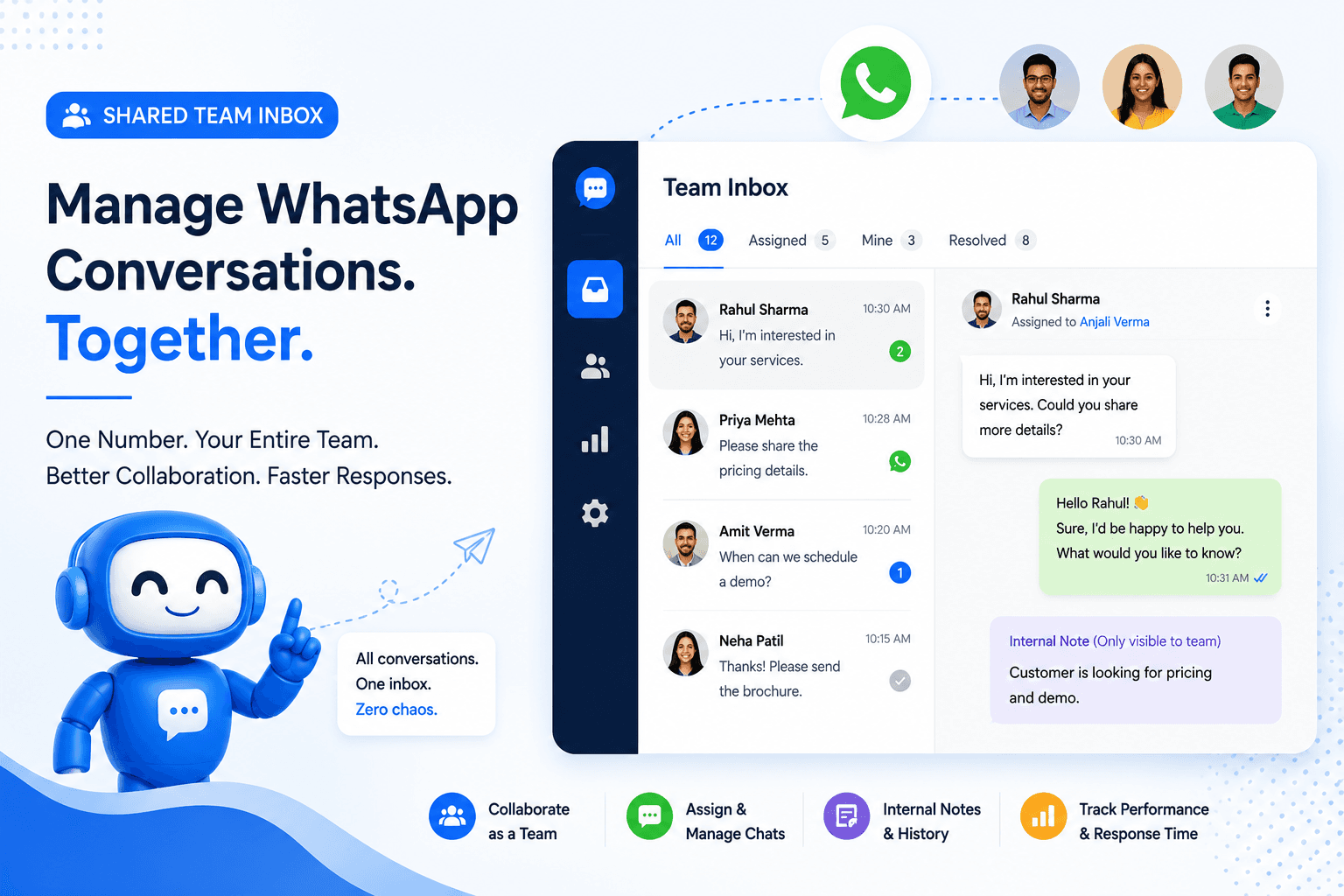
A Shared Team Inbox is a centralized workspace where multiple team members can access and manage conversations from a single WhatsApp Business API number.
Instead of one person handling every message, conversations can be assigned to different departments or agents while maintaining complete conversation history.
Everyone stays informed, customers receive faster responses, and businesses operate more efficiently.
Why Businesses Struggle Without a Shared Inbox
Many businesses experience the same problems:
- Only one employee can effectively manage customer chats.
- Sales and support teams accidentally reply to the same customer.
- Important follow-ups are forgotten.
- Customers have to repeat the same information.
- No one knows who is handling which conversation.
- Managers cannot monitor team performance.
As customer inquiries increase, these small issues become expensive problems that impact customer satisfaction and sales.
How a Shared Team Inbox Works
Instead of every employee using separate WhatsApp accounts, all conversations are displayed inside one dashboard.
Each conversation can be:
- Assigned to a specific team member
- Transferred between departments
- Marked as resolved
- Prioritized based on urgency
- Tracked from first inquiry to final resolution
This creates a smoother experience for both customers and employees.
Benefits of Using a Shared Team Inbox
Faster Response Times
Incoming conversations are visible to the entire team, reducing waiting times and ensuring customers receive prompt responses.
Better Team Collaboration
Sales, support, and operations teams can work together without switching devices or forwarding screenshots.
No Missed Conversations
Every customer inquiry remains visible until it is assigned and resolved.
Complete Conversation History
Agents can review previous interactions before responding, eliminating the need for customers to repeat information.
Improved Accountability
Managers can see who is handling each conversation and monitor response times across the team.
How TheQuickAssist Makes Team Collaboration Easier
TheQuickAssist includes a powerful Shared Team Inbox designed for businesses that manage customer communication through WhatsApp.
With TheQuickAssist, your team can:
- Manage multiple conversations from one dashboard.
- Assign chats to specific team members.
- Transfer conversations between departments.
- View complete customer history before replying.
- Add internal notes that customers cannot see.
- Monitor response times and team performance.
- Work together using a single WhatsApp Business number.
Whether your business has two employees or fifty, everyone works from the same platform without confusion.
Combine Your Shared Inbox with Other TheQuickAssist Features
A Shared Team Inbox becomes even more powerful when combined with automation features available in TheQuickAssist.
AI Agent
The AI Agent answers common customer questions instantly and transfers more complex conversations to the appropriate team member.
Customers can book appointments directly through WhatsApp while your team manages confirmations and follow-ups from the Shared Inbox.
Workflow Automation
Automatically assign conversations, trigger follow-ups, and notify team members without manual intervention.
WhatsApp Template Management
Create, manage, and send approved WhatsApp templates for reminders, confirmations, and marketing campaigns directly from one platform.
Flexible Pricing
Businesses can start with plans that match their current requirements and upgrade as customer conversations grow.
Who Benefits Most from a Shared Team Inbox?
- Real Estate Agencies
- Healthcare Clinics
- Educational Institutions
- Travel Agencies
- Marketing Agencies
- Automotive Businesses
- Retail Stores
- E-commerce Brands
- Customer Support Teams
Choosing the Right Platform
When evaluating a Shared Team Inbox solution, look for:
- WhatsApp Business API support
- AI-powered automation
- Conversation assignment
- Internal team notes
- Workflow automation
- Analytics and reporting
- CRM integration
- Scalable pricing
You can also read our guide on What Is a WhatsApp CRM? to understand how a CRM works alongside a Shared Team Inbox.
Final Thoughts
Managing customer conversations from a single phone may work when your business is small, but it quickly becomes inefficient as your team and customer base grow.
A Shared Team Inbox helps businesses collaborate more effectively, respond faster, and ensure every customer receives timely, consistent support.
Combined with AI automation, appointment booking, workflow automation, and CRM capabilities, it becomes the foundation of a scalable customer communication strategy.
Ready to Manage Customer Conversations as a Team?
See how TheQuickAssist helps businesses collaborate through a Shared Team Inbox while automating customer communication with AI-powered tools.
Book Your Free Demo →
Question for You
How many team members currently need access to your business WhatsApp conversations?